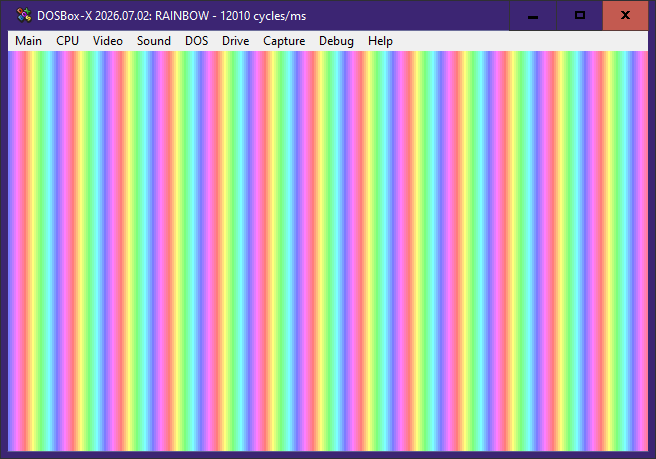
In this experiment, we’ll draw a repeating rainbow using Turbo Pascal without using any graphics libraries. We will go through step by step, with a short explanation accompanying each snippet
I’m assuming that you know some basic Pascal syntax, Turbo Pascal 7, and keywords like program, var, and begin ... end., so that the explanation can be much less verbose
Switching to VGA mode 13h
asm
  mov ax, 13h
  int 10h
end;Explanation:mov ax, 13h — This loads the AX register to select VGA Mode 13h, which is followed immediately by a BIOS interrupt callint 10h — This invokes the BIOS video service
Using this snippet, the resulting screen has a resolution of 320×200 pixels, with 1 byte per pixel
Drawing a horizontal rainbow
for a:=0 to 319 do
mem[$A000:a] := 56 + a mod 24;Explanation:$A000 is the segment containing the VGA framebuffera is the horizontal pixel coordinate, in other word, x56 + a mod 24 generates a repeating palette from 56 to 79
The numbers stored in video memory are palette indices, not plain RGB colour values. You can read more about the palette on Wikipedia: Mode 13h
Filling the entire screen
This is the most interesting part: copying the first row to the rest of the VGA rows
for b:=1 to 199 do
move(mem[$A000:0], mem[$A000:b * 320], 320);Explanation:
Each row occupies exactly 320 bytes in the video memory
The Move procedure copies 320 bytes from the first row to the destination row
The variable b is declared as word, otherwise Turbo Pascal will throw a “Range check error”
That’s because 199 * 320 = 63680, which is an arithmetic overflow if we were to use an integer. In Turbo Pascal, integer is signed, and is only 16 bit (max 32767)
Waiting and restoring text mode
This is the snippet to return to the usual text mode, which we can use at the end of the programme:
readln;
asm
mov ax, 03h
int 10h
end;Explanation:readln — This simply waits for Enter, nothing moremov ax, 03h — Selects text mode 03hint 10h — The same as above
Complete source code
program VGARainbow;
var
a: integer;
b: word;
begin
{ Switch to VGA mode 13h }
asm
  mov ax, 13h
  int 10h
end;
{ Draw the first row }
for a:=0 to 319 do
  mem[$A000:a] := 56 + a mod 24;
{ Copy the row across the screen }
for b:=1 to 199 do
  move(mem[$A000:0], mem[$A000:b * 320], 320);
readln;
{ Restore text mode }
asm
mov ax, 03h
int 10h
end;
end.Conclusion
That’s it! We’ve drawn a repeating rainbow in VGA mode 13h by writing 1 row to video memory, and then copying the first row to the rest of the screen using Move
You can experiment further by changing the palette indices, modifying the pattern, or drawing something else
This example was written for Turbo Pascal 7 and can be run in DOSBox or any compatible DOS environment
Happy experimenting!