About WebAssembly games in Pascal on itch.io

At the time of writing, there’s only a single browser game that uses Pascal on itch.io, while the rest is only for desktop, which you can visit on itch.io
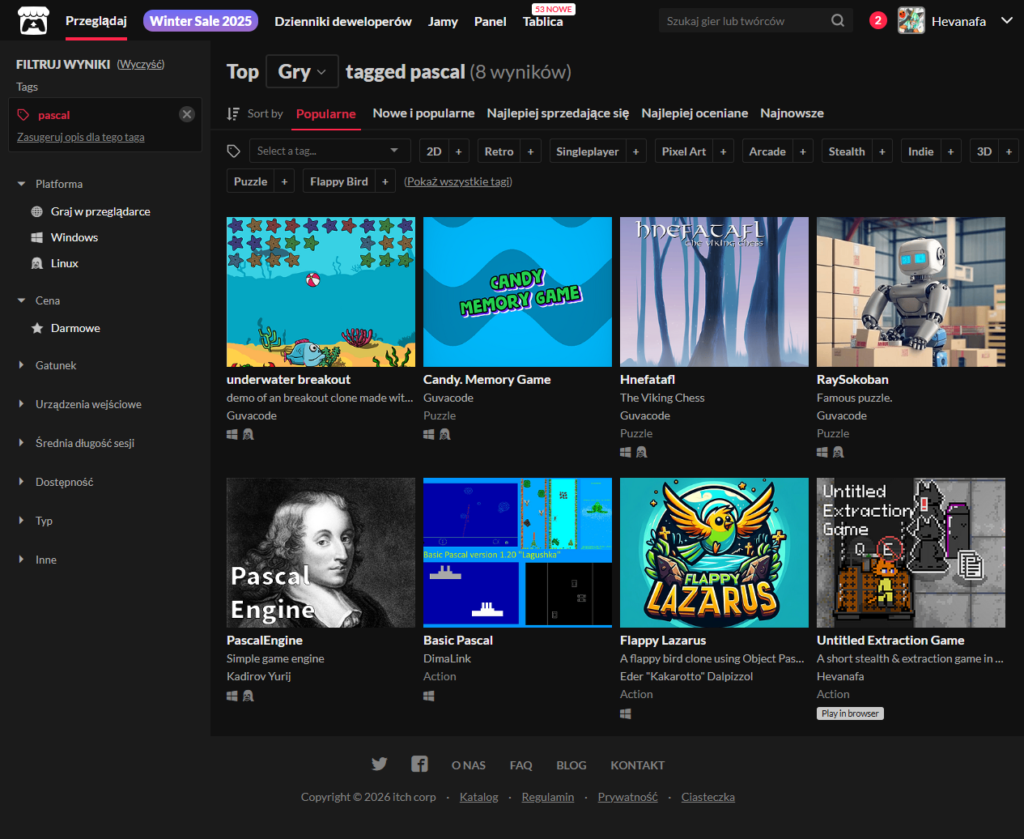
There’s only a handful of submissions and contributors to the Pascal tag on itch.io:

  • 4 games by Guvacode
  • 1 by Kadirov Yurij
  • 1 by DimaLink
  • 1 by Eder “Kakarotto” Dalpizzol
  • and 1 by Hevanafa (me!)

Do you know what this means?

Yes, I’m a self-proclaimed pioneer in this field

I have to thank the Free Pascal team that made all of this possible. Without them, programming in Pascal targeting WebAssembly wouldn’t be possible

I also have hopes that, someday, my game engine Posit-92 can be listed on the “Engines & tools used”, which you can find using this URL format: https://itch.io/game/tools/[your_game_id]

or by using the UI directly:

  • Edit Game –> Metadata –> Engines & tools
Posted in Indie games, Personal | Tagged , , , | Leave a comment

Posit-92 – Gamepad Demo

 
Posted in Uncategorized | Leave a comment

Immediate Easing Chain

This document was written in order to understand easing chains in immediate mode, i.e. without object-oriented tween systems like what Phaser JS (scene.tweens), Unity (DOTween), and Roblox (TweenService) have

This approach can be applied to any other frameworks that don’t have any built-in tweening library included, e.g. PICO-8, TIC-80, SDL2, and Raylib

If you wish to skip reading & see the demonstration right away, here’s the game in action:


Controls

Click Start Lerp to watch Blinky’s animation chain (move, move backwards, spin)

After the chain completes, use WASD to move him freely!

Variable Declaration

Before we start on the update & render logic, let’s declare the variables first

Prepare the state variables, which will contain the [started], [complete] and [index in the chain]

var
  isChainStarted, isChainComplete: boolean;
  chainIdx: integer;

Declare the state variables that you want to apply easing to

var
  startX, endX: integer;
  startAngle, endAngle: double;
  chainLerpTimer: TLerpTimer;

The key here is that you must have at least:

  • Start & end variable pair
  • 1 TLerpTimer

This pattern below can work too, if you only want to interpolate x:

var
  startX, endX: integer;
  chainLerpTimer: TLerpTimer;

Starting logic

This section should only handle chain state initialisation

procedure beginEasingChain;
begin
  isChainStarted := true;
  isChainComplete := false;
  chainIdx := 0;

  startX := 100; endX := 150;
  initLerp(chainLerpTimer, getTimer, 1.0)
end;

It has the [started], [complete] and the [index in the chain], and also the variables to interpolate later
Don’t forget to initialise the TLerpTimer

Update logic

Update logic only handles state transition

Given this example:

if isChainStarted and not isChainComplete then begin
  { Handle state transition }
  if isLerpComplete(chainLerpTimer, getTimer) then begin
    case chainIdx of
      0: begin
        { Initialise your state here }
      end;
      1: begin
        { Same pattern as index 0 }
        inc(chainIdx)
      end;
      
      2: inc(chainIdx); { Immediate transition, no setup needed }
      
      3: begin
        { Handle chain onComplete }

        isChainStarted := false;
        isChainComplete := true;
      end;
    end;
  end;
end;

This shows the transition from chainIdx 0 to 1

Your state initialisation in case chainIdx of 0 can be structured like this:

perc := getLerpPerc(chainLerpTimer, getTimer);
x := lerpEaseOutSine(startX, endX, perc);  { current X }

startX := trunc(x);
endX := endX - 50;
initLerp(chainLerpTimer, getTimer, 1.0);

inc(chainIdx)

Basically:

  • Initialise the state variables,
  • Initialise the TLerpTimer associated with it,
  • Increment chain index, or
    • Store the final state somewhere and assign complete

Movement logic

This can be handled when the easing chain is not in progress

This condition can be used to check if it’s still in progress:

if isChainStarted and not isChainComplete then

or shorter:

if not isChainStarted then

An example here is for when you want to move Blinky:

if not isChainStarted then begin
  if isKeyDown(SC_W) then blinkyY := blinkyY - Velocity * dt;
  if isKeyDown(SC_S) then blinkyY := blinkyY + Velocity * dt;

  if isKeyDown(SC_A) then blinkyX := blinkyX - Velocity * dt;
  if isKeyDown(SC_D) then blinkyX := blinkyX + Velocity * dt;
end;

Render logic

This should not have side effects, i.e. not altering the state variables

You can use the [started] variable to see if the easing chain is still going

if isChainStarted then begin
  case chainIdx of
    2: begin
      { Current state --> apply easing --> handle rendering }
      perc := getLerpPerc(chainLerpTimer, getTimer);

      x := lerpEaseOutSine(startX, endX, perc);
      angle := lerpEaseOutSine(startAngle, endAngle, perc);

      sprRotate(imgBlinky, trunc(x) + 8, trunc(blinkyY) + 8, angle);
    end;
    
    else begin
      perc := getLerpPerc(chainLerpTimer, getTimer);
      x := lerpEaseOutSine(startX, endX, perc);
      spr(imgBlinky, trunc(x), trunc(blinkyY));
    end
  end;
end else
  spr(imgBlinky, trunc(blinkyX), trunc(blinkyY));

Basically:

  • If the chain is still ongoing, move the sprite normally
  • An exception is when the chainIdx has the number 2, it’s moving and rotating at the same time
  • Otherwise, the else branch handles when the chain is not yet started or is already completed: just render the sprite normally

State Flow

(Not started)
|
v
Button press: call beginEasingChain
|
v
Running: chainIdx 0, 1, 2
|
v
Complete when chainIdx reaches 3
|
v
(Finished): isChainComplete is true, can move with WASD

Posted in Indie games, Posit-92 | Tagged , , | Leave a comment

Posit-92 – Hello World

A very basic example of Posit-92

Posted in Posit-92 | Tagged , , , , | Leave a comment

Hello Canvas – Getting Started with Pascal & WebAssembly

This tutorial will guide you through how to setup Pascal targeting WebAssembly without using Pas2JS — pure Pascal code directly compiled to WASM

Why does this guide exist? It’s because I find so many outdated documentations — many of them are from 2021, and also they mentioned wasi instead of wasm32

What we’ll have for the compilation target in this series is wasm32-embedded, not wasi. The difference is that wasi is mainly for desktop & offline systems that has direct file I/O operations and is some sort of bootstrapped framework, while wasm32 is for HTML5 games on the web and has the “close to metal” feeling

What you’ll achieve by the end of the tutorial:

  • FPC compiler setup for wasm32-embedded
  • Compile your first Pascal –> Wasm binary
  • See a coloured rectangle on an HTML canvas
  • Understand the JS glue code

Prerequisites

I’m using a Windows 10 (64-bit) machine to build this. It’s possible to use Mac OS or Linux, but this guide is focused on Windows

Other than that:

  • Basic Pascal knowledge (knowing some other languages can help too)
  • Text editor (I recommend VSCode)

Compiler Setup

We’ll use fpcupdeluxe because it handles the cross-compilation setup automatically. Manual FPC setup for WebAssembly is painful, trust me

Step 1: Download fpcupdeluxe

Step 2: Install

  • Run the installer
  • Choose an easy-to-reach folder like C:\fpc-wasm or E:\fpc-wasm
  • (This matters for later when you need to reference the compiler path)

Step 3: Install FPC trunk

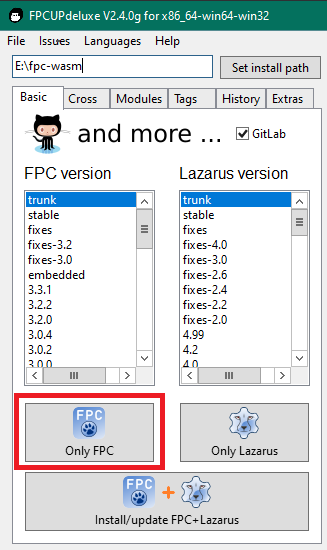
  • Under the Basic tab, select trunk version from the list
  • Click the Only FPC button
  • Wait for it to compile (this takes a few minutes)

Step 4: Add the WebAssembly cross-compiler

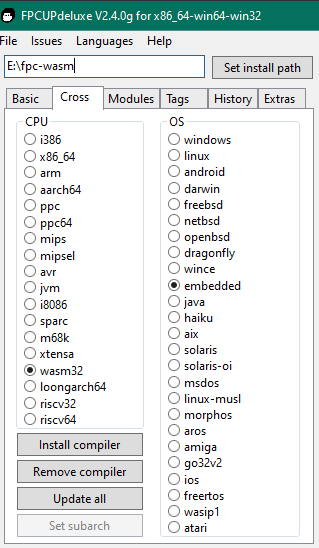
  • Go to the Cross tab
  • CPU: wasm32
  • OS: embedded
  • Click Install compiler
  • (Note: This might need a retry or two – it’s finicky)

Step 5: Verify it worked

This is the last step, verify if the installation works

I’m using E:\fpc-wasm as the installation directory, you can change it depending on the previous steps

You can choose either one of these options:

Option 1: Use the -iV switch

E:\fpc-wasm\fpc\bin\x86_64-win64\ppcrosswasm32.exe -iV

It should output the version number, something like 3.3.1

Option 2: Use test-path

Test-Path "E:\fpc-wasm\fpc\bin\x86_64-win64\ppcrosswasm32.exe"

If it outputs True, then you’re good to go

What’s Next?

Part 2 – Your first WASM program (coming soon)

Posted in Pascal + WebAssembly | Tagged , , , | Leave a comment

Posit-92 DOS Display Demo

A MS-DOS-like terminal interface built with my custom Pascal game framework (Posit-92 Wasm), showcasing CRT effects and retro computing aesthetics

Using the features from 26th Dec 2025

Features:

  • 8×8 CGA font rendering
  • Scrolling terminal with 40×25 char buffer
  • 16-colour text support
  • Animated scanline background
  • Snow particle system
  • Chiptune audio playback

Available commands:
Type HELP to see all commands, including DATE, TIME, DIR, MEM, SNOW and JINGLE

Technical details:

  • 100% software rendering (no GPU)
  • Written in Turbo Pascal dialect, compiled to WebAssembly
  • 640 KB simulated heap, like the classic DOS memory limit

Credits:

Posted in Indie games, Posit-92 | Tagged , | Leave a comment

Posit-92 Demo – CRT Effects

This demonstrates how Posit-92 Wasm handles 4 layers of filters, fully using software rendering (100% CPU, no GPU used)

The filter layers are as follows:

  • Phosphor glow filter
  • Chromatic aberration
  • Scanlines (25% darker)
  • Vignette

How to play

Simply click Play to start

Posted in Posit-92 | Tagged , , | Leave a comment

JMBlue Catch Game

I made this with QBJS (v0.10.1)

The image assets are made by @jmblue7827 on TikTok


Changelog

06-10-2025: Increased maximum fish to 30

Posted in Indie games | Leave a comment

QBJS Quirks Cheat Sheet

I’m adding this to share my thoughts, especially the quirks that QBJS 0.10.0 has at the time of writing.

Constants

All consts in QBJS should not have sigil suffixes:

const maxHealth = 100
const vgaWidth = 320

' Valid in QB64 but not in QBJS
const maxHealth% = 100
const vgaWidth& = 320

The interpreter will throw an error if you add a suffix. An example error message is something like this:

ERROR : 0 : Missing initializer in const declaration

This is due to how dynamic typing is implemented in its backend language (JS)

Variables

This of QBJS as a QB64-to-JS transpiler with the full power of JS

This makes dynamic typing possible, which is similar to Lua

Known Issue

Some variables with the system prefix may cause the transpiler to break

For example, with the name systemFont being used as a variable:

dim as TBMFont systemFont

This will cause the transpiler to sometimes produce an incomplete object string in JS, but this only happens occasionally

If this happens, just reorder your variable declarations — there may be occasional ordering-dependent bugs in the QBJS-to-JS transpiler

Image Handling

Image handles start at 1000 instead of a negative value

With the same example code

Option _Explicit

Dim As Long imgGasolineMaid
imgGasolineMaid = _LoadImage("IMG\gasoline_maid_256px.png")

Print "image handle:", imgGasolineMaid

_FreeImage imgGasolineMaid

This is the comparison:
QB64: image handle: -10
QBJS: image handle: 1000

Non-existent image

Loading a non-existent image is also possible, which is dangerous:

Option _Explicit

Dim As Long imgInvalid
imgInvalid = _loadImage("invalid_image.jpg")
Print "image handle:", imgInvalid

Output (QBJS):

image handle: 1000

This can be prevented with the _FileExists statement

Option _Explicit

Dim As Long imgInvalid
If Not _FileExists("invalid_image.jpg") Then
  Print "Invalid image doesn't exist!"
Else
  imgInvalid = _LoadImage("invalid_image.jpg")
  Print "image handle:", imgInvalid
End If

Output:

Invalid image doesn't exist!

Precompiler

$Let doesn’t work with QBJS

$If precompiler only works with either:

  • $If WEB then
  • $If Javascript then

Use $If WEB to use the functionalities that only exist in QBJS

Option _Explicit

$if WEB then
import console from "lib\web\console.bas"
console.log "Hello QBJS!"

$else
print "Hello QB64!"
$endif

Use $If Javascript block to execute any JS code in it:

Option _Explicit

Dim As Long a, b, c
$if javascript then
  a = 1
  b = 2
  c = a + b
$endif
print c

Output:

3

This makes it possible to use fetch API and BigInt along with QB64

Console / Debugging

$Debug and any Log statements (_LogError, _LogWarn, _LogTrace, and so on) don’t work in QBJS

Instead, use the Console import

Option _Explicit

$if web then
import console from "lib\web\console.bas"
console.log "Hello QBJS!"
console.warn "This is a warning"
console.error "This is an error log"
$endif

This makes it possible to use console in QBJS, but since everything is async under the hood, using console.log in Javascript context will throw an error

Function Return Value

Since QBJS uses JavaScript as its backend, it can return an object, or even a UDT

Option _Explicit

Type TCat
  name As String
  colour As String
End Type

Dim cat As TCat
cat = newCat("Honey", "orange")
Print cat.name, cat.colour

' implementation
Function newCat(name$, colour$)
  Dim c As TCat
  c.name = name$
  c.colour = colour$
  newCat = c
End Function

This makes it similar to VBScript but with full browser support

Module System

QBJS is more like the OOP in JS, which makes it also similar to Lua

MAIN.BAS

import console from "lib\web\console.bas"
import YourModule from "modules\hi.bas"

YourModule.sayHi
print YourModule.add(2, 3)

MODULES\HI.BAS

option _explicit

export sayHi, add

sub sayHi
  print "Hi from another module!"
end sub

function add(a, b)
  add = a + b
end function

JavaScript Interop

(TBA)

Sound Handling

(TBA)

MapTriangle

It’s not possible to use _MapTriangle statement in QBJS, so drawing a rotated image + scaled image is still a dream at the moment of writing

ByRef or ByVal?

QBJS always uses pass-by-value instead of pass-by-reference like what QB64 uses

Therefore, loadImage in QBJS returns a value instead of assigning to the target image handle

Boolean value

The values true & false can be used immediately from JS

The AND, OR, and NOT operators in QBJS use JS bitwise operators under the hood (Ref: https://qb64phoenix.com/forum/showthread.php?tid=3376)

import console from "lib\web\console.bas"

console.log "What is TRUE? " + i32str(1 > 0)
console.log "What is FALSE? " + i32str(1 < 0)

true is 1, false is 0

This makes casting to strings can be easier instead of using the usual STR$

console.log "What is TRUE? " + (1 > 0)

Not operator in QBJS

The transpiler uses the ~ operator under the hood, which basically flips all the bits in the 64-bit integer. This makes it harder to track a boolean value & an actual integer

So, instead of using the usual

If Not isImageSet(imgHandle) Then Exit Sub

It’s better to use:

If isImageSet(imgHandle) = false Then Exit Sub

But in my case of returning an integer (supposedly), I’ll use an integer return value instead of a boolean. Something like this:

Function isImageSet% (imgHandle As Long)
  isImageSet = -(imgHandle >= 1000)
End Function

true is 1 in JS, while false is the same: 0

About _PutImage

Compared to QB64, it uses destX + destW - 1 and also destY + destH - 1 because of how the decrement is handled automatically under the hood

So this is the acceptable version in QBJS:

Sub sprRegion (imgHandle As Long, srcX%, srcY%, srcW%, srcH%, destX%, destY%)
  _PutImage (destX%, destY%)-(destX% + srcW%, destY% + srcH%), imgHandle, , (srcX%, srcY%)-(srcX% + srcW%, srcY% + srcH%)
End Sub

About copying a UDT

UDT’s (User-defined Types) in QBJS are basically just a JS object

It doesn’t support copying as if it’s a record in Pascal, since the object reference remains the same

I found this problem when calling loadBMFont, but the output is just ~~~~~~, while it should be something like "Hello QBJS!" but with PICO-8 font

So, instead of declaring tempGlyph at the beginning like what I usually do in Pascal, something like this:

sub loadBMFont ' procedure signature
  dim as TBMFontGlyph tempGlyph
  ' the rest of the implementation
end sub

It’s better to declare the variable inside the block it’s supposed to be

elseif startsWith(txtLine, "char") and not startsWith(txtLine, "chars") then
  dim as TBMFontGlyph tempGlyph
  ' the rest of the implementation
end if
Posted in Indie games, QB64 | Leave a comment

Posit-92 Game Framework

“Not retro for nostalgia. Retro for power”

Posit-92 game framework icon

A DOS-based game dev framework that lets you create authentic retro games with Turbo Pascal 7 along with modern tooling such as VSCode.

It’s not just retro, but it’s a 100% authentic retro development framework with DOS as the operating system.

The features are comparable with fantasy consoles like PICO-8 and TIC-80, which features inspired me to make something similar.

Another inspiration is Terry A. Davis’ TempleOS, which is an experimental OS that looks very similar to DOS but can be run on a 64-bit computer with more than 8 cores running at the same time.


Games Made

A game made for the PixelGameJamYT with the theme “Light is Dangerous”

Game Jam Page

A game made for the Monochromatic Game Jam 1

Game Jam Page


Demos

(TBA)


Features

  • Graphics:
    • VGA mode with double buffering by default,
    • Indexed bitmap support,
    • Primitive drawing statements,
    • BMFont support,
    • Microsoft bitmapped font (FNT) support,
    • Mode X interface
  • Input: Keyboard & mouse inputs with BIOS interrupts for competitive speed
  • Audio: PC speaker & AdLib interfaces
  • Performance monitor:
    • Deterministic delta time & FPS counter
    • Debug free memory size
  • Optimised for performance with assembly

Getting Started

  1. Clone the GitHub repository https://github.com/Hevanafa/Posit-92
  2. Navigate to boilerplate folder
  3. Open PowerShell
  4. Run copy_units.ps1 to copy UNITS folder into boilerplate
  5. Copy the boilerplate folder to your DOS drive
  6. Rename the folder as your project’s name

FAQ

Q: What are the system requirements?

A: When running with Turbo Pascal, I recommend you to use DOSBox-X with Pentium 60MHz (32090 cycles/ms) as the default CPU speed

Q: How to use with modern tooling such as VSCode?

A: When using VSCode, it’s best to use the Pascal extension and also DOSBox ready with Turbo Pascal open, so that you can immediately detect file changes & compile with F9 key in the IDE

Q: How to make & use my own fonts?

A: You can either use BMFont (use the text output) or Fony (save the font as FNT)


Screenshots

(TBA)

Posted in Indie games | Tagged | Leave a comment